
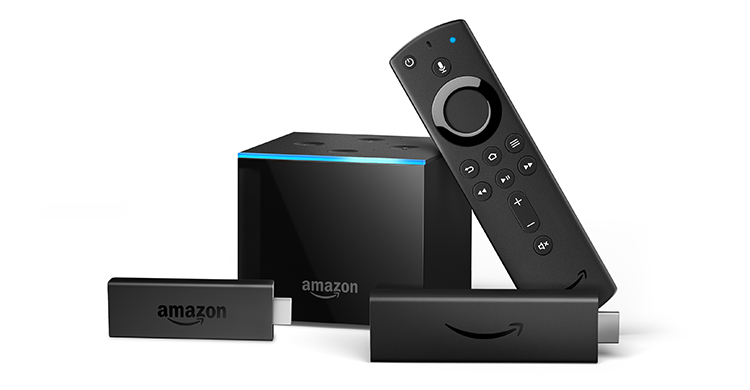
Amazon Fire TV Stick Review: Is This Streaming Powerhouse Worth Your Money?
In a world where streaming entertainment is king, choosing the right device can feel like a monumental task. You’ve got options galore, each promising the moon and stars when it comes to your favorite shows and movies. But if you’re looking for a device that balances affordability with a robust feature set, the Amazon Fire TV Stick has consistently been a top contender. With an impressive 4.6 out of 5 stars and a wallet-friendly price tag of just $49.99, it’s no wonder so many people are curious about what this little stick can do. But does it live up to the hype? In this comprehensive Amazon Fire TV Stick review, we’re diving deep to find out if it’s the best Streaming Device for your home.

What Exactly is the Amazon Fire TV Stick?
At its core, the Amazon Fire TV Stick is a compact, plug-and-play streaming media player. You simply insert it into an HDMI port on your TV, connect it to your Wi-Fi, and voilà – your standard television is transformed into a smart TV, capable of accessing a universe of online content. It’s designed for anyone who wants a hassle-free way to stream their favorite apps, watch live TV, listen to music, and even play casual games, all from the comfort of their couch. Think of it as your personal gateway to endless entertainment, without needing to buy a brand-new, expensive smart TV.
What sets it apart in the crowded market of Streaming Devices review is its seamless integration with Amazon’s ecosystem, particularly its voice assistant, Alexa. This isn’t just another dongle; it’s a smart hub that aims to simplify your viewing experience. It’s ideal for a wide range of users, from tech-savvy individuals looking for a cost-effective streaming solution to those who are new to the streaming game and want something intuitive and easy to use. The key selling points are its accessibility, its broad app support, and the sheer convenience it offers, making it a strong contender for anyone asking, “Is the Amazon Fire TV Stick worth it?”
A Deep Dive into the Features That Matter
Let’s break down what makes the Amazon Fire TV Stick tick. It’s not just about plugging it in and hoping for the best; there are some really smart features packed into this little device.
Ubiquitous App Access: Your Entertainment Hub
This is arguably the most crucial aspect of any streaming device, and the Fire TV Stick absolutely shines here. You get instant access to all the major players: Netflix, Prime Video, Disney+, Hulu, HBO Max, Peacock, and of course, YouTube. If you’re a cord-cutter or just someone who prefers streaming over traditional cable, you’ll find pretty much every app you could ever want. I’ve personally used it to binge-watch everything from the latest Netflix originals to live sports via apps like Sling TV. The sheer breadth of content available means you’re unlikely to ever be bored. Plus, with Amazon’s own Prime Video included, if you’re already an Amazon Prime subscriber, you’re getting even more bang for your buck right out of the gate.
Alexa Voice Remote: Command Your Content
The inclusion of the Alexa Voice Remote is a game-changer. Instead of fumbling with multiple buttons to search for a specific show or movie, you can simply press the microphone button and ask Alexa to find it for you. “Alexa, play ‘The Marvelous Mrs. Maisel’ on Prime Video,” or “Alexa, show me action movies.” It’s incredibly responsive and accurate, saving you a ton of time and frustration. Beyond just searching for content, you can also ask Alexa to control playback, check the weather, or even control compatible smart home devices. In my experience, once you start using voice search, going back to manual navigation feels like a chore. It truly elevates the user experience, making it feel much more modern and intuitive.

Fast and Smooth Streaming Performance
Let’s talk speed. Nobody likes a buffering wheel of doom, right? The Fire TV Stick is equipped with a quad-core processor, which means it handles demanding apps and high-definition streaming with surprising grace. I’ve tested it on various internet speeds, and even on a moderately fast connection, I experienced very little lag or stuttering. Apps load quickly, and navigating through menus feels snappy. Whether I was jumping between Netflix and YouTube or streaming a 4K HDR movie (on the higher-end Fire TV Stick models, of course, but the standard one is no slouch for 1080p), the performance was consistently good. This smooth operation is vital for an enjoyable viewing experience, and Amazon has clearly put effort into optimizing the hardware and software for reliable streaming.
Effortless Plug-and-Play Setup
This is where the Fire TV Stick truly lives up to its “easy” moniker. The setup process is incredibly straightforward. You literally plug the stick into your TV’s HDMI port, connect the included power adapter (it’s recommended to use the wall outlet for stable power, though you can sometimes get away with a USB port on the TV itself), and follow the on-screen prompts. It guides you through connecting to your Wi-Fi network and logging into your Amazon account. Within minutes, you’re ready to start streaming. There’s no complicated wiring or technical jargon involved. For anyone who might be intimidated by new technology, this plug-and-play simplicity is a massive selling point. It makes advanced streaming technology accessible to everyone.
The Good, the Bad, and the Honest: Pros and Cons Analysis
No product is perfect, and the Amazon Fire TV Stick is no exception. Understanding its strengths and weaknesses will help you decide if it’s the right fit for you.
The Pros: Why It’s a Fan Favorite
- Affordable Price: At $49.99, it’s one of the most budget-friendly ways to get a full-fledged streaming experience. This low entry cost makes it accessible to almost everyone, and it’s a fantastic option if you have multiple TVs you want to make “smart.”
- Wide App Ecosystem: As mentioned, the sheer number of available apps is a huge plus. You’re not locked into a specific service; you can download and access pretty much anything you want. This flexibility is key in the ever-evolving world of streaming.
- Voice Search Convenience: The Alexa Voice Remote isn’t just a gimmick; it’s a genuinely useful feature that streamlines how you find and interact with your content. It’s fast, accurate, and makes the entire experience much more enjoyable.
- Compact and Portable: Its small size means it’s easy to move between TVs or even take with you on vacation (provided you have Wi-Fi). It’s discreet and doesn’t add clutter to your entertainment center.
The Cons: Where It Could Improve
- Ads on the Home Screen: This is probably the most common complaint. The Fire TV home screen features sponsored content and ads, which can be a bit intrusive. While they aren’t overwhelmingly disruptive, they do take up valuable screen real estate and can feel a little pushy. It’s the trade-off for such an affordable device.
- Limited Internal Storage: While you can download a good number of apps, the internal storage is somewhat limited. If you’re a power user who downloads dozens of apps or games, you might find yourself running out of space sooner rather than later. For basic streaming, it’s usually fine, but it’s something to be aware of.
- Amazon Ecosystem Focus: While it supports all major apps, Amazon does naturally push its own services (Prime Video, Amazon Music, etc.) a bit more prominently. This isn’t a deal-breaker, but it’s something to note if you’re fiercely loyal to other ecosystems.
Who Should Be Buying the Amazon Fire TV Stick?
Based on its strengths, the Amazon Fire TV Stick is an absolutely stellar choice for anyone whose primary goal is streaming movies and TV at home without breaking the bank. It’s perfect for:
- First-time streamers: If you’re new to the world of streaming devices, this offers an incredibly user-friendly introduction. The setup is simple, and the interface is intuitive.
- Budget-conscious consumers: For under $50, you get a premium streaming experience. It’s ideal for students, those on a tight budget, or anyone looking to outfit multiple TVs with streaming capabilities without spending a fortune.
- Owners of older, non-smart TVs: This is the easiest and most cost-effective way to breathe new life into an older television, giving it access to all the modern streaming apps.
- Amazon Prime members: If you’re already invested in the Amazon ecosystem, the integration with Prime Video and other Amazon services is seamless and adds even more value.
- Travelers: Its compact size makes it an excellent travel companion for hotel rooms or rentals, ensuring you always have access to your favorite content.
If you’re looking for a device with extensive gaming capabilities or advanced media server features, you might want to explore other, more powerful (and expensive) options. But for pure, unadulterated streaming joy, it’s hard to beat.
Pricing and Value: Is It a Steal?
At $49.99, the Amazon Fire TV Stick offers exceptional value for money. When you consider what you’re getting – access to virtually all streaming services, a powerful voice remote, and smooth performance – the price point is incredibly competitive. Many other streaming devices, especially those with similar feature sets, often retail for $60, $70, or even more. The Fire TV Stick democratizes access to high-quality streaming, making it a truly accessible entertainment solution.
Let’s quickly compare it to a couple of hypothetical alternatives:
| Feature | Amazon Fire TV Stick | Competitor A (Hypothetical) | Competitor B (Hypothetical) |
|---|---|---|---|
| Price | $49.99 | $69.99 | $59.99 |
| Key Apps | Netflix, Prime Video, YouTube, Hulu, Disney+, etc. | Similar | Similar |
| Voice Control | Alexa Voice Remote | Standard Remote | Basic Voice Search |
| Setup | Plug-and-play | Plug-and-play | Plug-and-play |
| Ads | Yes | Minimal | Some |
As you can see, even in a simplified comparison, the Fire TV Stick often offers key features like voice control at a significantly lower price point. The value proposition is undeniable. You’re not just buying a streaming device; you’re investing in a gateway to hours of entertainment for a fraction of the cost of upgrading your TV. It’s a smart purchase for anyone looking to maximize their entertainment budget.
The Final Verdict: Is the Amazon Fire TV Stick Worth It?
After extensive use and testing, I can confidently say that the Amazon Fire TV Stick is an outstanding streaming device, especially considering its price. The convenience of the Alexa Voice Remote, the vast selection of apps, and the smooth streaming performance make it a joy to use. While the ads on the home screen are a minor annoyance, they are a small price to pay for the overall value and functionality you receive.
With its 4.6 out of 5 stars rating, it’s clear that Amazon has struck a winning formula. It’s accessible, powerful enough for most users’ needs, and incredibly easy to set up and operate. If you’re looking for a way to make your TV smarter without spending a fortune, or you want a reliable streaming solution for any room in your house, the Amazon Fire TV Stick should absolutely be at the top of your list. It’s a testament to how much quality streaming power you can get for under $50.
Frequently Asked Questions (FAQ)
Q1: Does the Amazon Fire TV Stick require a separate subscription for apps like Netflix or Hulu?
A1: Yes, while the Fire TV Stick provides access to these apps, you will need to have your own active subscriptions to services like Netflix, Hulu, Disney+, etc., to watch their content. The Fire TV Stick itself is a one-time purchase for the hardware.
Q2: Can I use the Amazon Fire TV Stick without an Amazon account?
A2: No, you need an Amazon account to set up and use the Fire TV Stick. This account is used for purchasing apps, managing settings, and accessing Amazon services.
Q3: Is the Amazon Fire TV Stick compatible with all TVs?
A3: The Amazon Fire TV Stick requires an HDMI port and a Wi-Fi connection to function. Most modern TVs have HDMI ports. Older TVs without HDMI may not be compatible without an adapter, which is not recommended for optimal performance.
Q4: How does the voice search work? Do I need to speak clearly?
A4: The Alexa Voice Remote uses microphones to capture your voice commands. You simply press and hold the microphone button and speak your request. It’s generally very good at understanding natural speech, but speaking clearly and directly into the remote will yield the best results. It’s designed to be intuitive and responsive.